A pager for your phone. No account, no sign-up.
Mast Pager gives you a URL. Post a line of text to it from a script, a cron job or Home Assistant, and your phone rings until you answer. Give the app permission once and it gets through silent mode and Do Not Disturb.

 iPhone with iOS 17.2 or later, Apple Watch optional, or Android 12 or later. Free.
Mast Pager is the phone half of Tissue Mast, our uptime monitor. The app works fine on its own. Sign in, and Tissue Mast checks your sites and rings you through the same app when one goes down.
how it works
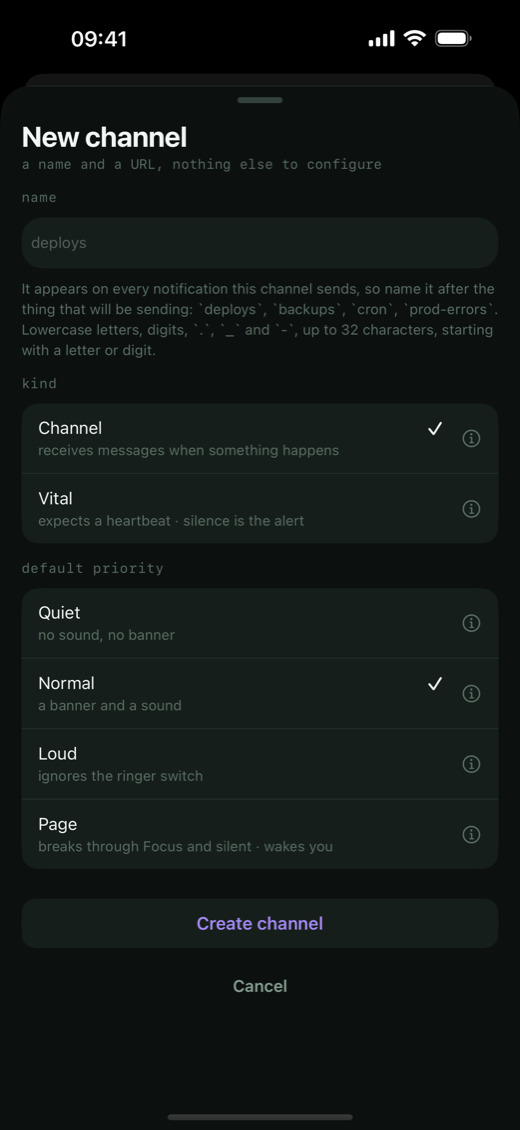
You make an alert source in the app and it gives you a URL. Anything that can make an HTTP request can post to it: a cron job, a health check, a CI run, a Home Assistant automation. The phone is the only credential, and the URL is the only secret.
The sender says how urgent a message is. If a URL leaks, someone can fill up your feed, but they can't make it ring any louder than the limit you've set for that alert source on your phone.
Vitals work the other way around. Your job checks in on a schedule, say after every nightly backup, and if a check-in doesn't show up, the phone rings.
$ curl -d "disk 92% on db1" https://mast.tissue.dev/mk_9f2a41c8b7

$ curl -d "db1 unreachable" \
    "https://mast.tissue.dev/mk_9f2a41c8b7?priority=page"

# a vital: the backup checks in when it lands
0 3 * * *  backup.sh && curl -fsS https://mast.tissue.dev/mk_5d20b3e7f1
The server logs each message as it goes: sent, delivered, repeated, acknowledged from the lock screen at 03:02.
free on its own, and Tissue Mast does the watching
The app rings when something tells it to. Tissue Mast can be that something. It fetches your sites from eight places, notices when a cron job misses its check-in, and pages you through Mast Pager. A page from a probe says which cities failed and what the server sent back, so you know whether it's your site or one network before you open a laptop.
the app on its own
Install it and make an alert source. Nothing to sign up for.
- 2 alert sources and 1 vital
- 1,000 messages a month
- 7 days of history
- everything about the ring: levels, highest levels, mute hours, acknowledging from the lock screen or a Watch
with a Tissue Mast account
Sign in from the app's settings. The free account needs only an email address.
- 10 probes: your sites and ports checked from eight places
- 10 alert sources, 10 vitals and 10,000 messages a month
- on call for up to five people: you, then one backup
- on Team, $29 a month for everyone: rotations and escalation through the team, status pages and 90 days of history
Your alert sources keep their URLs when you sign in. Nothing you set up on the phone has to be made again.
four levels
Every message carries one. Each alert source has a highest level, so a noisy sender can't page you with something that should have been a banner.
- quiet into the feed, no sound, no banner
- normal a banner and a sound, like any app
- loud time-sensitive: gets through a Focus, rings once
- page repeats until you acknowledge it, and gets through silent mode and Do Not Disturb once you’ve turned on Critical Alerts on iPhone, or given it Do Not Disturb access on Android
Mute hours, muting and a pause for a meeting are set per alert source on the phone. The Mast Pager guide covers them, and what to check so a page really wakes you.
what people page themselves with
- Home Assistant: a garage door left open, a freezer warming up, a water leak, with nothing to install
- Ham radio: HamAlert spots for POTA and SOTA, and a heartbeat for the Pi in the shack
- One day on the pager: a Tuesday end to end, with a bad night in it
- Sending from anything: deduping, closing a page from the monitor that opened it, waiting for a human